 |
Cloud storage allows you to access your files anytime from virtually anywhere on almost any device. With plenty of free cloud storage services to choose from, the cloud integration features in SharpLynx v7 provide an easy way to receive cloud-based POS reports without any on-going monthly fees. SharpLynx v8 due for release January 30, 2017SharpLynx v8 will take our cloud-based POS reports solution to a new level. It will include the ability to schedule regular sales updates from your Sharp ECR/POS terminals throughout your trading day with up-to-date reports sent automatically to your smart device. Cloud-based POS reports Contact your SharpLynx Reseller or submit an enquiry via our Contact Us page if you would like more information. |
Author: Lynx Software
SharpLynx v7.04.0013
Release Date: 01/11/2016
New Feature
- Improved support for scaling on high DPI displays using Windows DPI Virtualization
SharpLynx v7.03.0007
Release Date: 03/08/2016
New Feature
- Sell Price 1 column added to Select Item, Select PLU and Select Barcode data grids
SharpLynx v7.03.0004
Release Date: 22/07/2016
New Features
- Cloud option added to Data Listings
- Report paper size option added to Preferences > Other
SharpLynx v7.02.0011
Release Date: 05/04/2016
New Feature
A column showing the Date/Time Collected has been added to Process and Unprocess Sales Batches grids.
SharpLynx v7.02.0009
Release Date: 29/03/2016
Emailing Reports and Listings
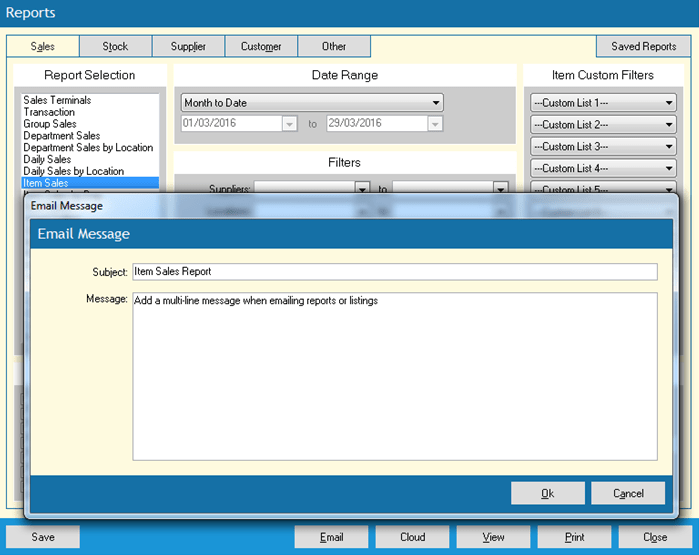
An Email Message dialog has been added when emailing reports or listings. You can now edit the Subject line of the email and add a multi-line message to the body of the email.
Export Items for Label Printing
Support has been added for exporting to Seagull Scientific BarTender 2016 software.

SharpLynx v7.01.0003
Release Date: 03/03/2016
Stocktake
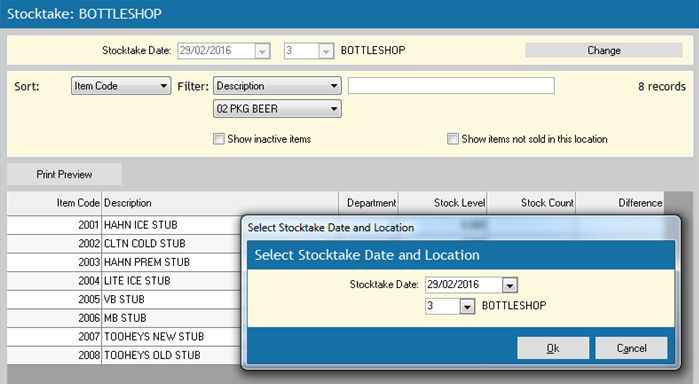
A Select Stocktake Date and Location dialog has been added to reduce calculating stock levels events. In previous versions changing the stocktake date would trigger a calculating stock levels event and then changing the location would trigger it again. Now you can simply click on the Change button to set both the stocktake date and the location and the stock levels will only be calculated once when you click Ok to accept the changes. This new dialog also prevents errors caused by attempting other operations while stock levels are being calculated.
Menu and Shortcut Bar
Saved Reports has been added as an option in the Sales menu and shortcut bar.
SharpLynx v7.00.0040
Release Date: 15/02/2016
Sales Batch Reports Data Grid Improvements
This update includes some exciting improvements to the Sales Batch Reports data grid.
- Sales Terminal, Location and Date Range filters
- Z Counter columns
- Select Columns option

Clerk Filter on Electronic Journal Report
Now you can view or print an Electronic Journal Report for a specific Clerk or a range of Clerks.
LynxAssist Support & Training
Produced by Lynx Software’s official support partner, POSLynx, the LynxAssist Support & Training web site has been designed to help Lynx Software users to get the most out of their software investment.
- Free Training Tutorials and Videos
- Frequently Asked Questions
- LynxAssist Training Course
- News, tips and other helpful information
- Subscribe for free and receive regular updates via email
Click here to check out LynxAssist.com now!
Version 7 Release
We are pleased to announce the release of SharpLynx v7. See the following posts for some of the highlights …
New Features:
- Grid-style editing of Clerk Names
- Print option added to various data grids
- Select Columns option added to some data grids
- Alternating row style on data grids option
- Increased row height on data grids option
- Stock Coverage Report
- Top Customers Report
- Price Level filter on Item Sales and Item Sales by Day reports
- Zero price items excluded from Zero Item Sales Report if they have a sales quantity for the selected data range
- Group by category option on Stock Write-offs Report
- Last Visit date shown on Customer Analysis Report
- Email Address maintenance added to Setup
- Email Address selection dialog added to Reports, Listings and Scheduled Job maintenance
- Email Log Report
- Cloud Drives maintenance added to Setup
- Cloud Drive selection dialog added to Reports and Scheduled Job maintenance
- Non-busy modal forms closed automatically before executing Scheduled Jobs
- Sell Price Column selection in Item Selling Prices saved and used as default
- Sell Prices 1 to 8 added to Items grid
- Last Visit date/time added to Customers grid
- Total number of labels shown on Export Items for Label Printing dialog
- Option to use Last Cost for cost of sales
 SharpLynx